



Every extra step between attention and understanding costs energy.
Sometimes that cost is small. A slow page. A confusing floorplan download. A form that asks for too much too early.
Sometimes it is much more expensive. The buyer leaves, chooses a competing project, or arrives at the sales team already frustrated.
A buyer friction audit helps developers see those losses more clearly.
At its simplest, the audit asks one question: where is the journey harder than it needs to be? The answer may involve the website, the mobile experience, the handoff into the CRM, outdated assets, disconnected tools, or slow follow-up after enquiry. In most cases, the biggest problems are not dramatic. They are accumulations of small obstacles that make the project feel harder to understand.
Map the actual journey, not the ideal one
The first step is to document what the buyer really experiences.
That path often includes:
- ad, search, social post, broker, portal, or referral
- landing page or project website
- visual exploration, floorplans, or unit tools
- enquiry or registration
- CRM routing
- sales follow-up
- appointment, presentation, or reservation
Most teams already have an intended journey in mind. That is not enough.
The audit should look at the real path across devices, channels, and touchpoints. It should ask what happens when someone arrives on mobile, what happens when they want pricing, what happens when they compare units, and what happens when they submit a form outside business hours.
Only then does friction become visible.
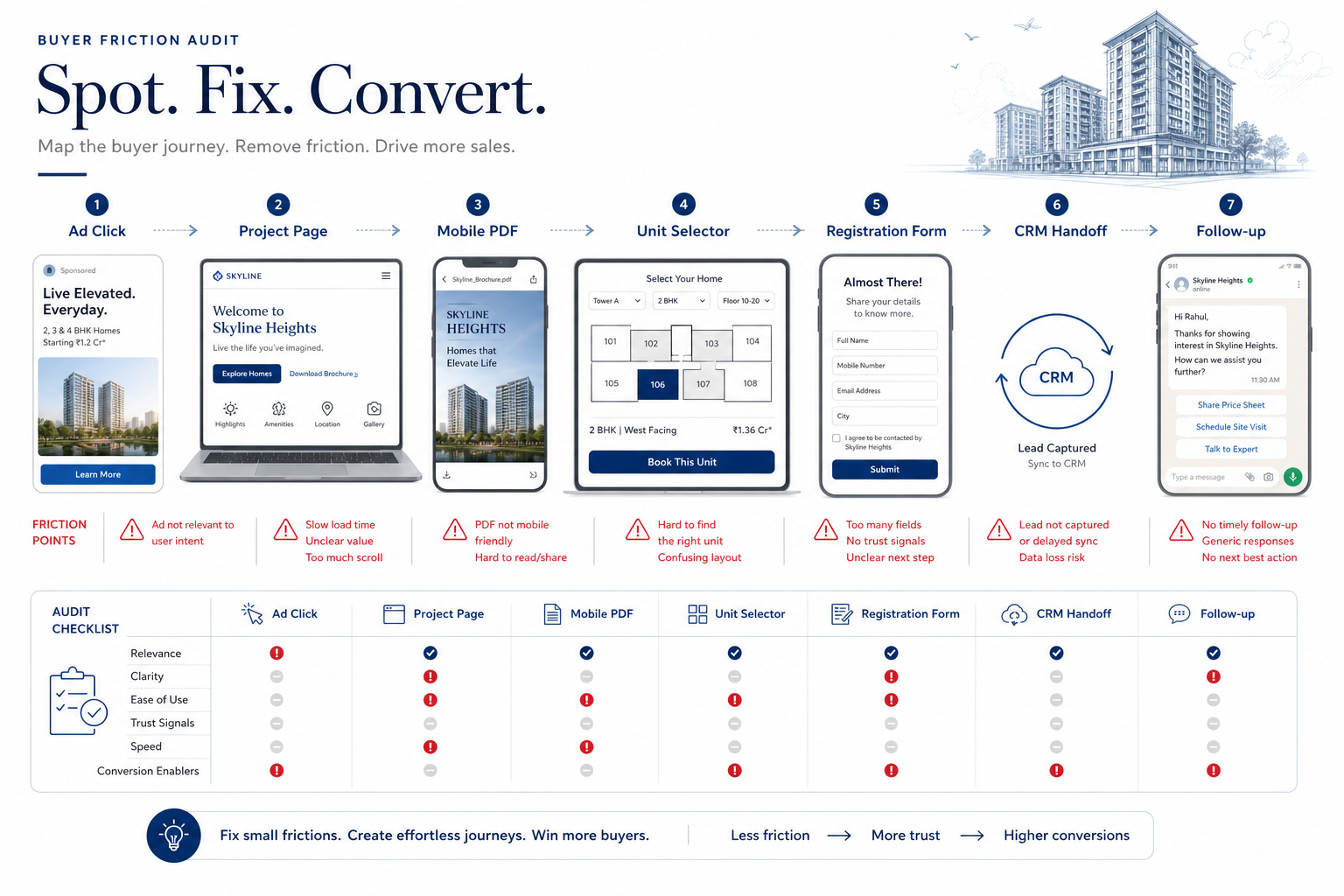
The most common friction points
Real estate projects usually underperform in familiar places.
Weak first-step clarity
The buyer lands on a page and still cannot immediately tell:
- what the project is
- who it is for
- why it is distinctive
- what the next step should be
This is often a positioning problem disguised as a UX problem.
Poor mobile handling
Many assets still behave badly on phones. PDFs are hard to read, galleries load slowly, CTAs are buried, and floorplans require too much zooming.
For developers competing in high-intent digital environments, that is not a small issue. It is a conversion leak.
Disconnected tools
The buyer starts on the website, jumps into a unit selector with a different visual language, opens a third-party virtual-tour tab, and then lands on an unrelated enquiry form. Each jump weakens continuity.
As MARKETIKA's article on why developers should stop making buyers jump between different tools suggests in broader principle, connected journeys feel more trustworthy than fragmented ones.
Missing information at high-intent moments
Sometimes the friction is simply that the buyer cannot find what they need when interest peaks.
That could include:
- location explanation
- pricing context
- payment-plan clarity
- developer proof
- unit comparison support
- a clear path to speak with sales
Slow or context-poor follow-up
The audit should not stop at the website.
Harvard Business Review's analysis of online sales leads remains a strong reminder that delays after enquiry destroy value quickly. If the lead is routed slowly or sales has no meaningful context, friction continues after the form fill.
How to prioritize what to fix
Not every issue has equal commercial weight.
The smartest approach is to fix the friction closest to serious buyer intent first.
If a buyer cannot compare units, request information, or receive timely follow-up, that matters more than a purely cosmetic issue on a low-traffic page.
What data to use in the audit
A useful friction audit combines multiple signals:
- analytics and drop-off patterns
- form completion rates
- mobile behavior
- CRM routing and response speed
- recurring sales-team feedback
- buyer questions and objections
- broker feedback where relevant
This is one reason sales feedback should shape marketing and website planning should reflect the buyer journey. Friction is easiest to spot when teams compare digital data with human conversations.
A simple audit framework developers can reuse
A practical recurring audit can follow this rhythm:
Step 1. Walk the journey yourself
Use mobile and desktop. Click ads. Open floorplans. Test the form. Experience the site as a buyer would.
Step 2. List every avoidable obstacle
Anything confusing, redundant, slow, or disconnected belongs on the list.
Step 3. Mark which obstacles sit nearest to high intent
Focus on pages and moments tied to enquiry, unit comparison, pricing, or scheduling.
Step 4. Pair the UX issues with sales feedback
If buyers repeatedly ask a question in calls, and the site does not answer it, that is friction.
Step 5. Fix in batches and measure again
A friction audit only becomes valuable when improvements are actually implemented and reviewed.
Final takeaway
The best buyer journey is not the one with the most features.
It is the one that makes the next step feel obvious.
Developers who audit friction regularly give buyers less to struggle with, sales teams less to compensate for, and campaigns a better chance of turning attention into serious conversations.